小伙伴给了两道ctf说帮忙看看,感觉挺有意思的,这里简单记录一下。https://bohemian.top/images/RATTRACER.zip,有兴趣的小伙伴可以先试一下。
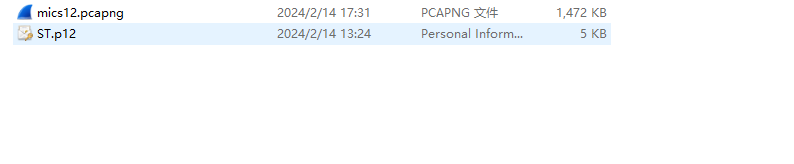
开局给到两个文件
这里一看就是 证书 需要解密
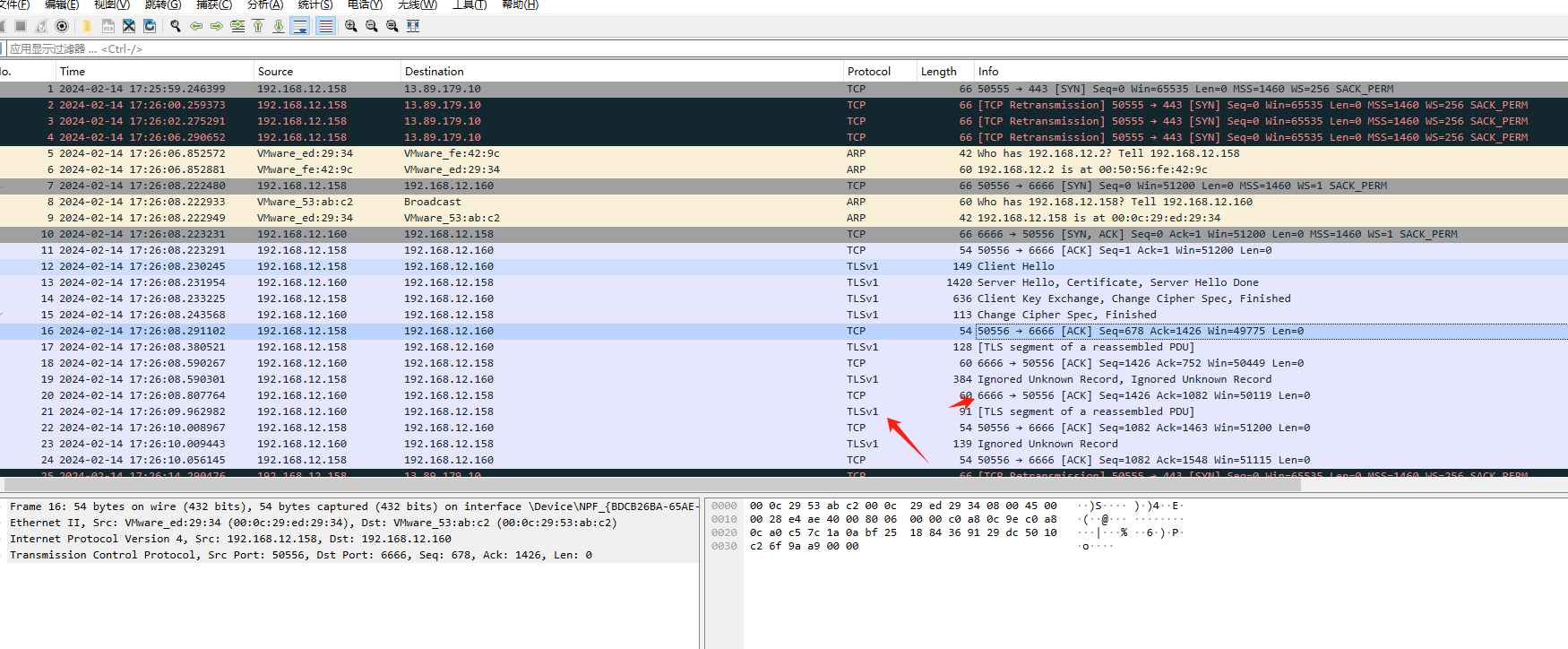
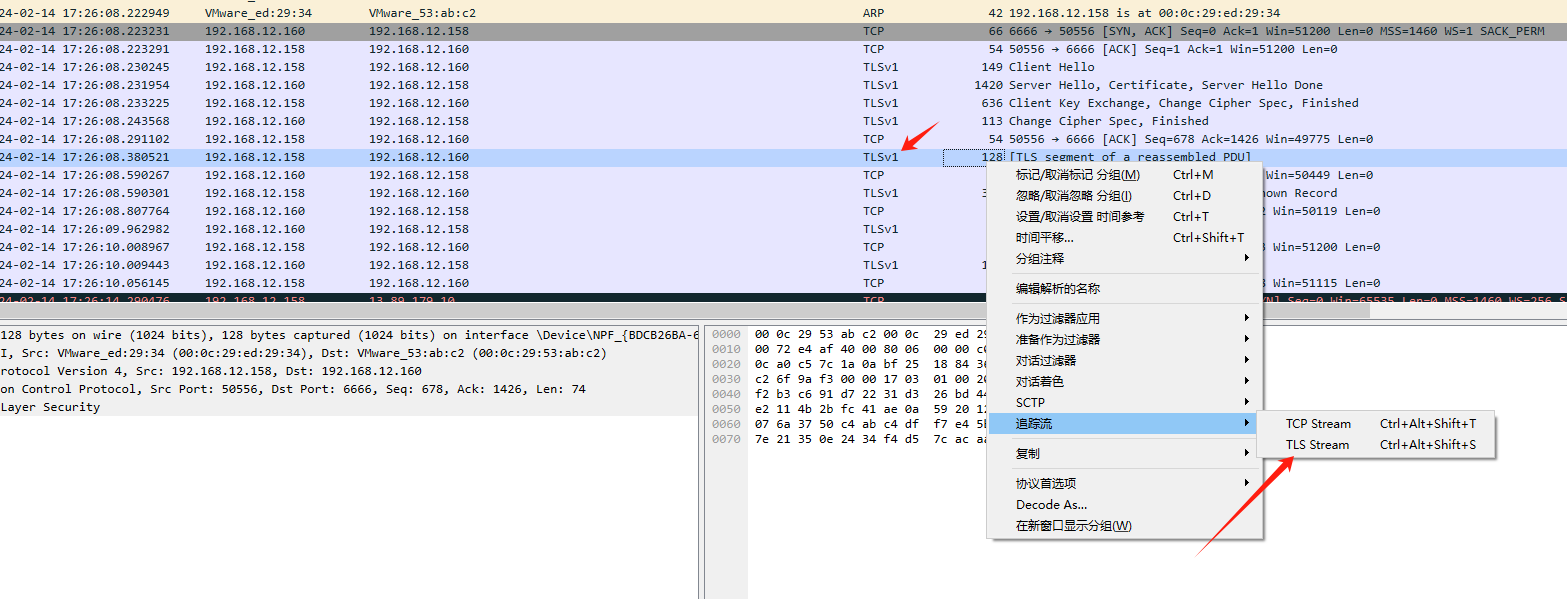
打开wireshark 可以看到是 tlsv1的流量 这里需要解密。PKCS#12 格式的证书文件 ,通常以 .p12 或 .pfx 结尾,用来 **同时存储证书 (Certificate) + 私钥 (Private Key)**,而且可以设置密码保护。
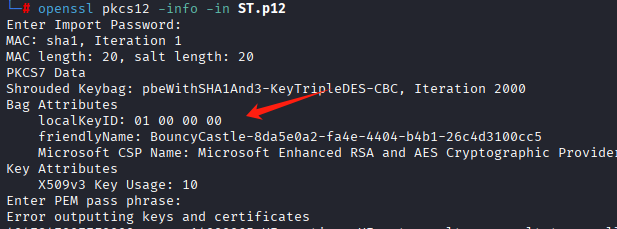
这里知道p12有私钥,会有密码保护openssl pkcs12 -info -in ST.p12敲这个会让我们输入密码,直接回车,显示
说明没有密码,openssl pkcs12 -legacy -in ST.p12 -nocerts -nodes -out key.pem直接命令提私钥即可。让我们输密码,直接回车即可。
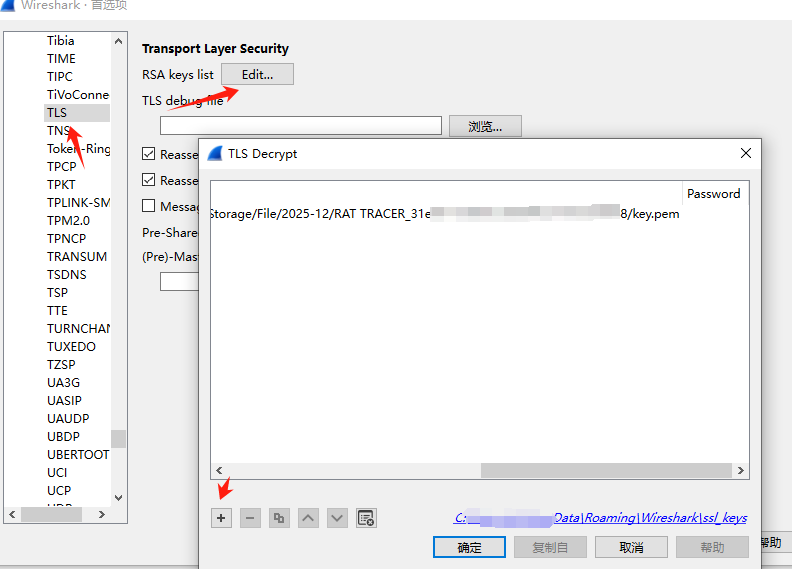
此时导入私钥。wireshrak ->编解->首选项–>protocols->tls
ip port 协议 和私钥填写好。
此时你随便选中一个tls流量就可以看到解密后的流量了,
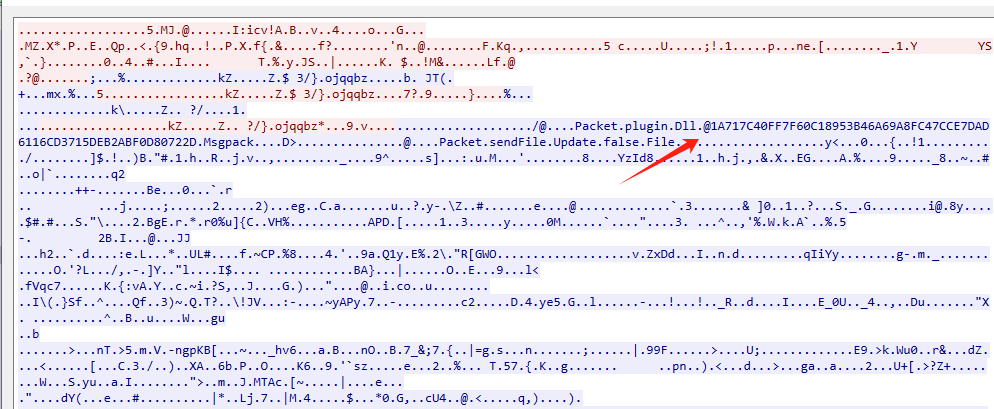
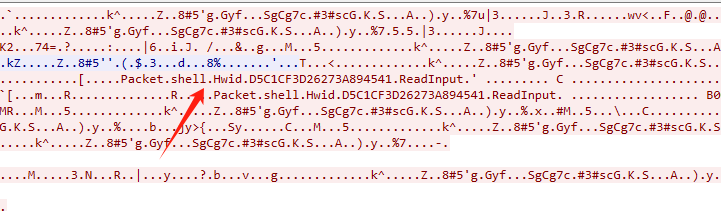
此时看到里面还是 加密的,但是可以看到一点点特征。这个rat的特征呢。
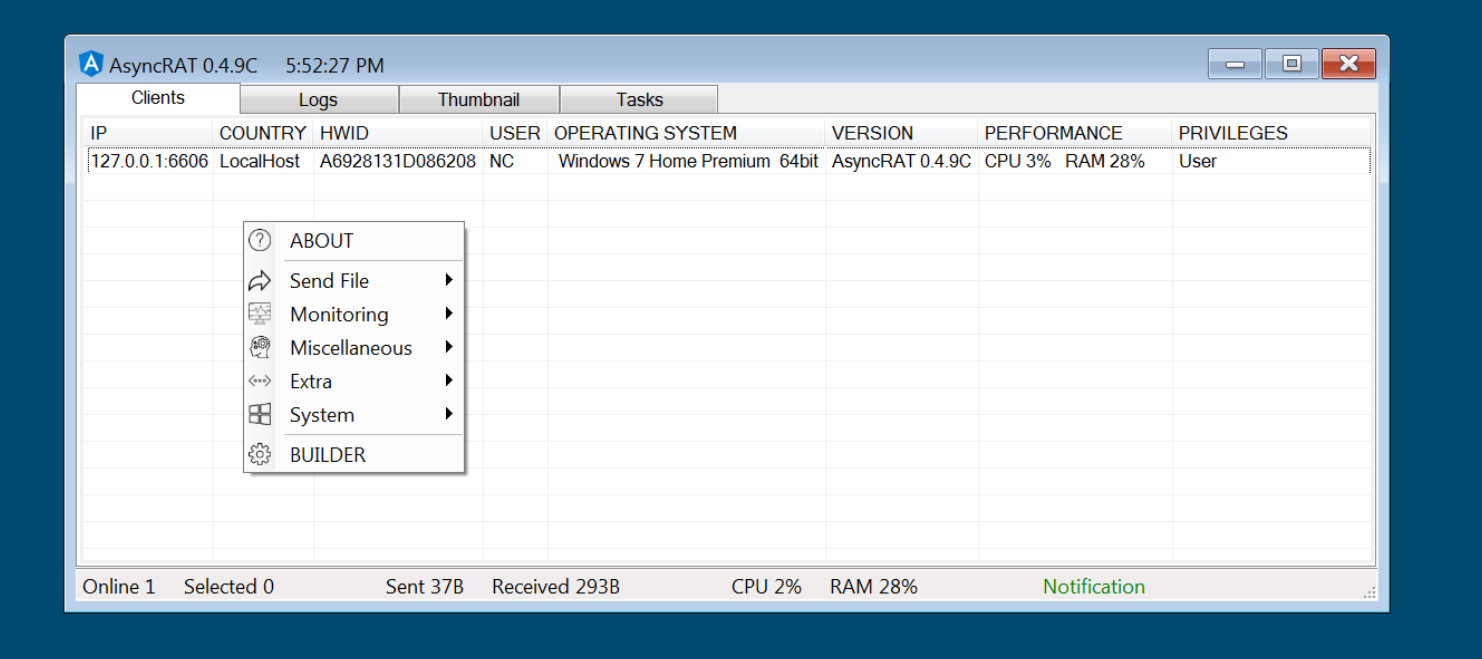
经过对这个特征的搜索,找到一篇大师傅的文章,发现为AsyncRAT,
开源项目https://github.com/NYAN-x-CAT/AsyncRAT-C-Sharp
在https://mp.weixin.qq.com/s/AJUQ8Zd_4Q3Ub9TarQx5Gg文章中 已经给出了详细的解密流程,简单来说就是外层是套了tls的数据,有私钥就能解,内层也就是现在看到的,不涉及加解密,只涉及gunzip 和unzip ,再就是文件结构了。在仔细看大师傅文章中说的使用到的aes key及HMACSHA256 key,aes key及HMACSHA256 key是对配置信息进行解密,也就是解密样本的,在此题中不涉及,就不讲了。接下来看通信。
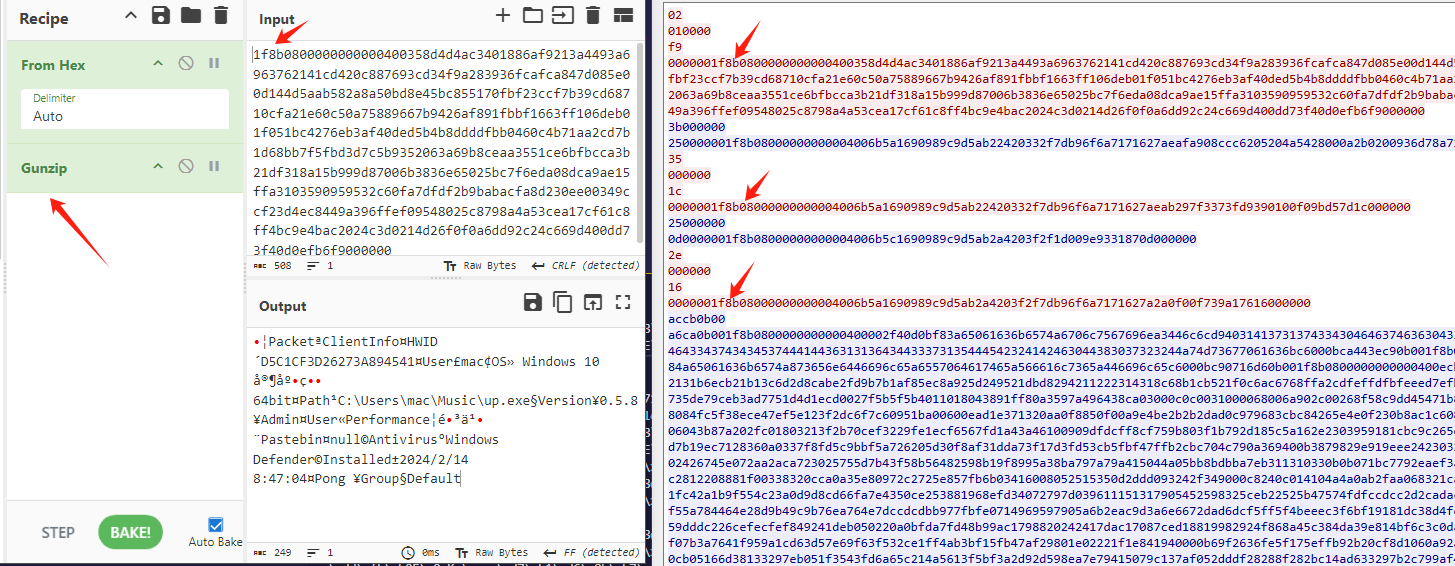
这里选择一个数据包,其中从1f 8b 08 开始,这是gzip的hex头,然后gunzip即可,解出所有流量了,这里给出python批量脚本。这里需要先将所有的流都保存为bin文件,其实什么文件都行。
1
2
3
4
5
6
7
8
9
10
11
12
13
14
15
16
17
18
19
20
21
22
23
24
25
26
27
28
29
30
31
32
33
34
35
36
37
38
39
40
41
42
43
44
45
46
47
48
49
50
51
52
53
54
55
56
57
58
59
60
61
62
63
64
65
66
67
68
69
70
71
72
73
74
75
76
77
78
79
80
81
82
83
84
85
86
87
88
89
90
91
92
93
94
95
96
97
98
99
100
101
102
103
104
105
106
107
108
109
110
111
112
113
114
115
116
117
118
119
120
121
122
123
124
125
126
127
128
129
130
131
132
133
134
135
136
137
138
139
140
141
142
143
144
145
146
147
148
149
150
151
152
153
154
155
156
157
158
159
160
161
162
163
164
165
166
167
168
169
170
171
172
173
174
175
176
177
178
179
180
181
182
183
184
185
186
187
188
189
190
191
192
193
194
195
196
197
198
199
200
201
202
203
import osimport structimport binasciiimport globimport gzipimport hashlibfrom common import reverse_data, bytes_to_int, gzip_uncompress, hash_data_sha256, write_filedef getbuflen (buf, isreverse=False ): """获取缓冲区长度""" tmp = buf[:] if isreverse: tmp = reverse_data(tmp) return bytes_to_int(tmp) def parseMsgPack (data ): """解析MsgPack数据""" output = [] output.append(str (data[0 ] - 0x80 )) off = 1 while off < len (data): buf, num = readstring(data[off:]) if num != 0 : output.append(buf) off += num else : break if buf == "Msgpack" : msgbuf, num = readbinary(data[off:]) if num != 0 : output.append(msgbuf) off += num if len (output) >= 2 and output[-1 ] == "Dll" and output[-2 ] == "savePlugin" : msgbuf, num = readbinary(data[off:]) if num != 0 : output.append(msgbuf) off += num return "->" .join(output), off def readstring (data ): """读取字符串""" if not data: return "" , 0 byteflag = data[0 ] if 160 <= byteflag <= 191 : num = byteflag - 160 if len (data) < num + 1 : return "" , 0 output = data[1 :num+1 ].decode('utf-8' , errors='ignore' ) return output, num + 1 elif byteflag == 217 : if len (data) < 2 : return "" , 0 num = data[1 ] if len (data) < num + 2 : return "" , 0 output = data[2 :num+2 ].decode('utf-8' , errors='ignore' ) return output, num + 2 return "" , 0 def readbinary (buf ): """读取二进制数据""" if not buf: return "" , 0 byteflag = buf[0 ] if byteflag == 0xc4 : if len (buf) < 2 : return "" , 0 len_zipdata = buf[1 ] if len (buf) < 6 + len_zipdata - 4 : return "" , 0 len_data = getbuflen(buf[2 :6 ], True ) zipdata = buf[6 :6 +len_zipdata-4 ] data = gzip_uncompress(zipdata) if data is None or len_data != len (data): return "" , 0 output, off = parseMsgPack(data) if off != len (data): return "" , 0 return output, 2 + len_zipdata elif byteflag == 0xc6 : if len (buf) < 9 : return "" , 0 len_zipdata = getbuflen(buf[1 :5 ], False ) len_data = getbuflen(buf[5 :9 ], True ) if len (buf) < 9 + len_zipdata - 4 : return "" , 0 zipdata = buf[9 :9 +len_zipdata-4 ] data = gzip_uncompress(zipdata) if data is None or len_data != len (data): return "" , 0 if data.startswith(b'MZ' ): filename = "dll_" + hash_data_sha256(data) write_file(filename, data) output = "保存DLL,文件名为-" + filename return output, 1 + 4 + len_zipdata else : output, off = parseMsgPack(data) if "wallpaper" in output: if off + 5 < len (data): len_image = getbuflen(data[off+1 :off+5 ], False ) if off + 5 + len_image <= len (data): imagedata = data[off+5 :off+5 +len_image] filename = "image_" + hash_data_sha256(imagedata) write_file(filename, imagedata) output = "保存图片,文件名为-" + filename return output, 1 + 4 + len_zipdata return "" , 0 def process_bin_file (filename, output_file ): """处理单个bin文件""" try : with open (filename, 'rb' ) as f: data = f.read() except Exception as e: print (f"读取文件失败 {filename} : {e} " ) return print (f"处理文件: {filename} " ) base_name = os.path.splitext(os.path.basename(filename))[0 ] with open (output_file, 'a' , encoding='utf-8' ) as f: f.write(f"\n=== 处理文件: {filename} ===\n\n" ) num = 0 pkt_num = 0 while num < len (data): if num + 4 > len (data): break len_encodedata = getbuflen(data[num:num+4 ], True ) if num + len_encodedata + 4 > len (data): break encodedata = data[num+4 :num+4 +len_encodedata] if len (encodedata) < 4 : num += len_encodedata + 4 continue len_decodedata = getbuflen(encodedata[:4 ], True ) zipdata = encodedata[4 :] decodedata = gzip_uncompress(zipdata) if decodedata and len (decodedata) == len_decodedata: with open (output_file, 'a' , encoding='utf-8' ) as f: f.write(f"--- 数据包 {pkt_num} ---\n" ) if len_encodedata > 0x200 : f.write(f"加密数据:{binascii.hexlify(data[num:num+0x200 +4 ]).decode()} \n" ) f.write(f"解密数据_hex:{binascii.hexlify(decodedata[:0x200 ]).decode()} \n" ) else : f.write(f"加密数据:{binascii.hexlify(data[num:num+len_encodedata+4 ]).decode()} \n" ) f.write(f"解密数据_hex:{binascii.hexlify(decodedata).decode()} \n" ) output, off = parseMsgPack(decodedata) if off != len (decodedata): if "2->Packet->pong->Message" not in output: f.write("Error\n" ) f.write(f"解密通信指令:{output} \n\n" ) print (f"已处理数据包 {pkt_num} " ) pkt_num += 1 else : print ("!!!解压失败!!!" ) num += len_encodedata + 4 def main (): """主函数""" bin_files = glob.glob("*.bin" ) print (f"找到 {len (bin_files)} 个bin文件" ) output_file = "decrypted_output.txt" with open (output_file, 'w' , encoding='utf-8' ) as f: f.write("解密报告 - 所有bin文件数据\n" ) f.write("=" * 50 + "\n\n" ) for filename in bin_files: process_bin_file(filename, output_file) print (f"解密完成,结果保存到 {output_file} " ) main() if __name__ == "__main__" : main()
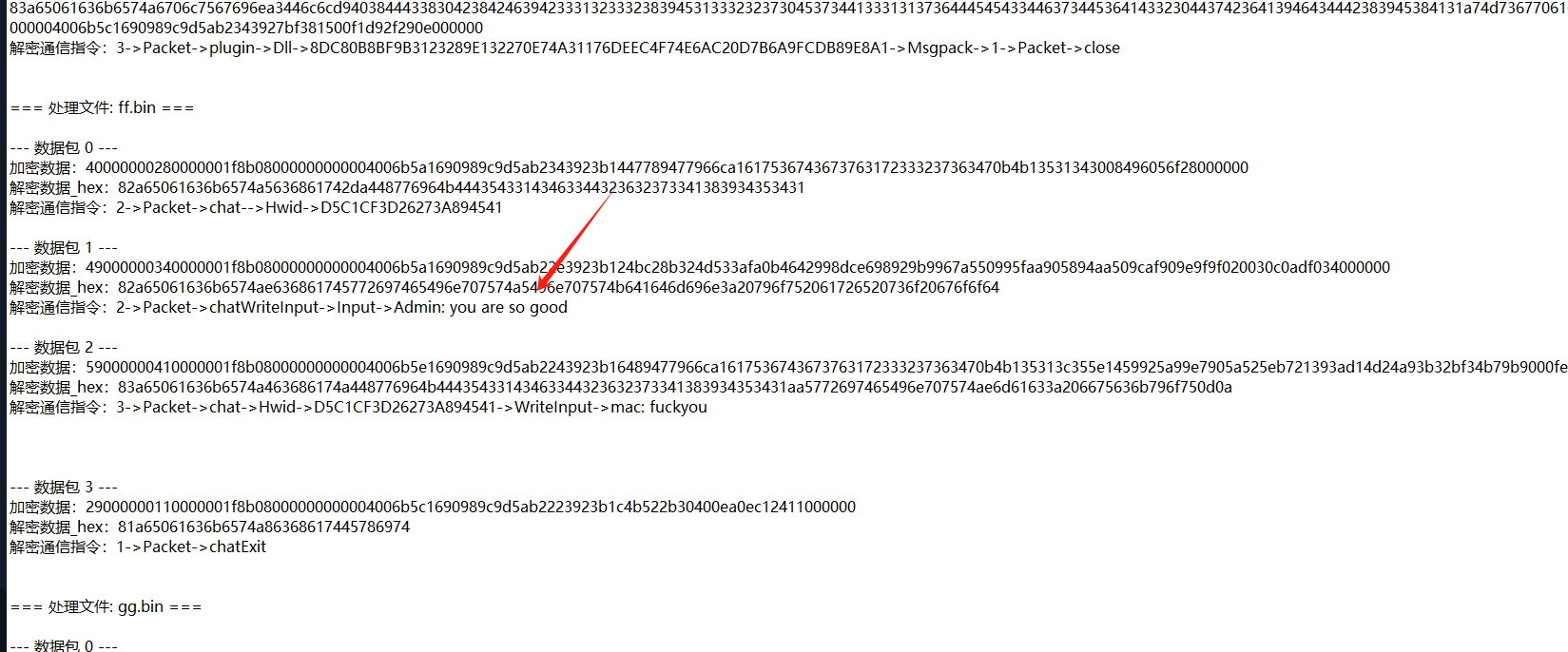
然后就可以解出所有相关信息了。这里小伙伴又说忘记题目是啥了,根据已知的信息,并没有flag关键字,那我们就将所有的流量提出来,这里你会问,不是已经把所有的流量都解出来了么,是的,但是有一个没有解出来,就是>remoteDesktop-,这是远程桌面的流量,可能出题人只是远程cat flag,
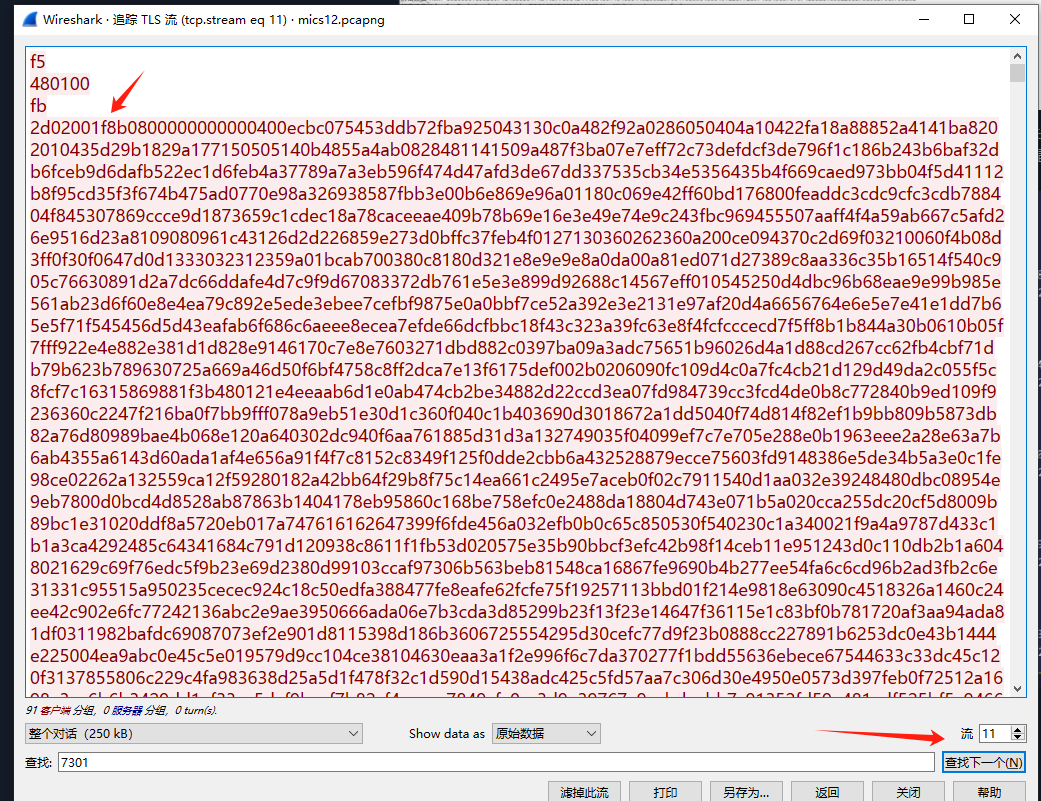
2流就是所有的数据,想办法提出来,首先找到
这种长的流,很长,
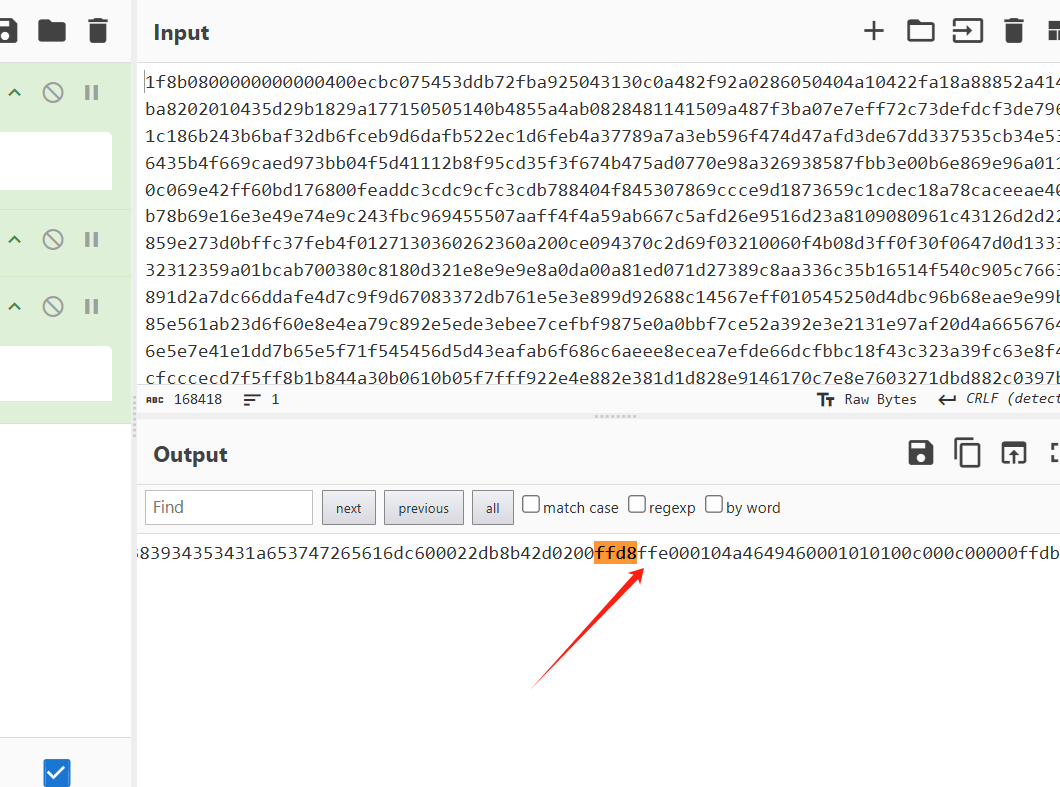
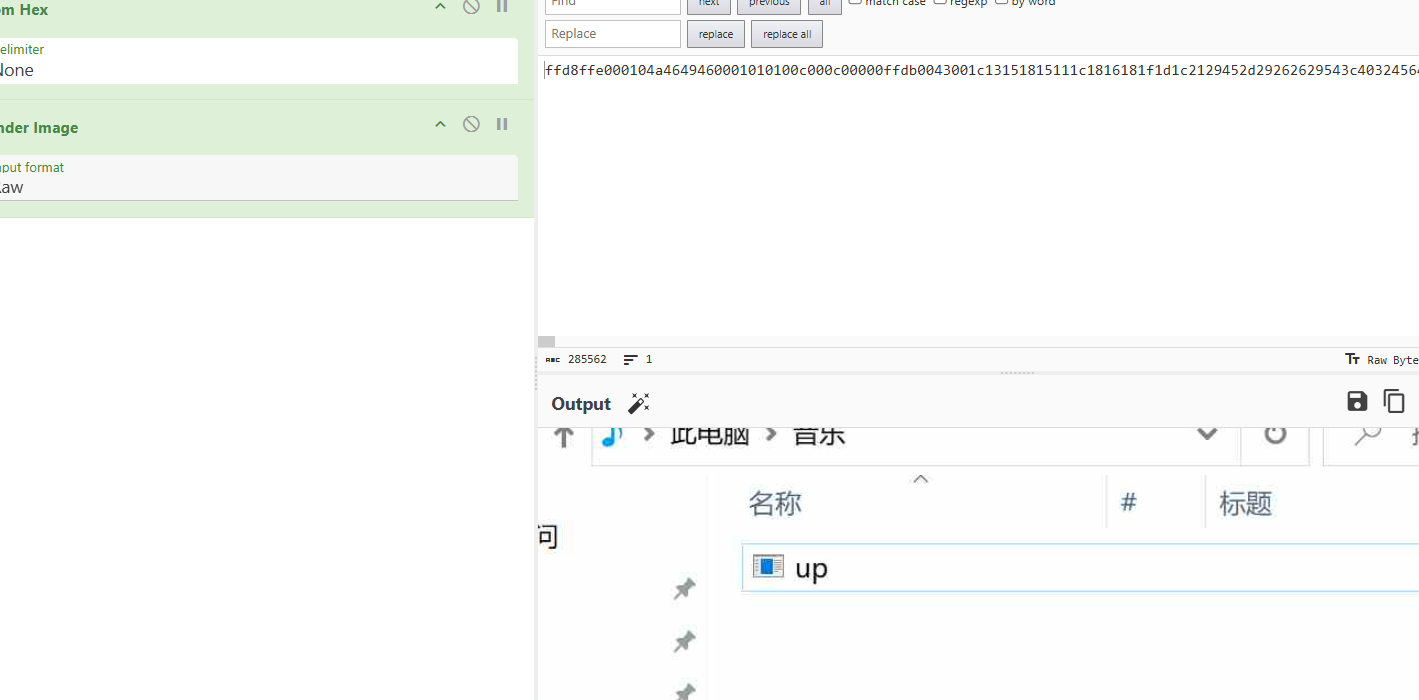
先解hex 在解gunzip 在进行tohex,这里就有图片的前缀了,
然后在解码就好了。
就可以解密所有rdp的流量了,一个一个提确实有点小慢,这里简单写个脚本
1
2
3
4
5
6
7
8
9
10
11
12
13
14
15
16
17
18
19
20
21
22
23
24
25
26
27
28
29
30
31
32
33
34
35
36
37
38
39
40
41
42
43
44
45
46
47
48
49
50
51
52
53
54
55
56
57
58
59
60
61
62
63
64
65
66
67
68
69
70
71
72
73
74
75
76
77
78
79
80
81
82
import osimport structimport gzipimport binasciifrom common import reverse_data, bytes_to_int, gzip_uncompressdef getbuflen (buf, isreverse=False ): """获取缓冲区长度""" tmp = buf[:] if isreverse: tmp = reverse_data(tmp) return bytes_to_int(tmp) def extract_jpeg_from_bin (bin_file, output_dir ): """从 bin 文件中提取 JPEG 图像""" if not os.path.exists(output_dir): os.makedirs(output_dir) try : with open (bin_file, 'rb' ) as f: data = f.read() except Exception as e: print (f"读取文件失败 {bin_file} : {e} " ) return print (f"处理文件: {bin_file} " ) num = 0 pkt_num = 0 jpeg_count = 0 while num < len (data): if num + 4 > len (data): break len_encodedata = getbuflen(data[num:num+4 ], True ) if num + len_encodedata + 4 > len (data): break encodedata = data[num+4 :num+4 +len_encodedata] if len (encodedata) < 4 : num += len_encodedata + 4 continue len_decodedata = getbuflen(encodedata[:4 ], True ) zipdata = encodedata[4 :] decodedata = gzip_uncompress(zipdata) if decodedata and len (decodedata) == len_decodedata: soi_index = decodedata.find(b'\xff\xd8\xff\xe0' ) if soi_index != -1 : jpeg_data = decodedata[soi_index:] eoi_index = jpeg_data.find(b'\xff\xd9' ) if eoi_index != -1 : jpeg_data = jpeg_data[:eoi_index + 2 ] filename = f"{output_dir} /packet_{pkt_num} .jpg" with open (filename, 'wb' ) as img_file: img_file.write(jpeg_data) print (f"提取 JPEG: {filename} " ) jpeg_count += 1 else : print (f"数据包 {pkt_num} : 未找到 JPEG EOI 标记" ) else : print (f"数据包 {pkt_num} : 未找到 JPEG SOI 标记" ) pkt_num += 1 else : print (f"数据包 {pkt_num} : 解压失败" ) num += len_encodedata + 4 print (f"\n提取完成,共提取 {jpeg_count} 个 JPEG 图像到 {output_dir} 目录" ) if __name__ == "__main__" : extract_jpeg_from_bin("bb.bin" , "extracted_images" )
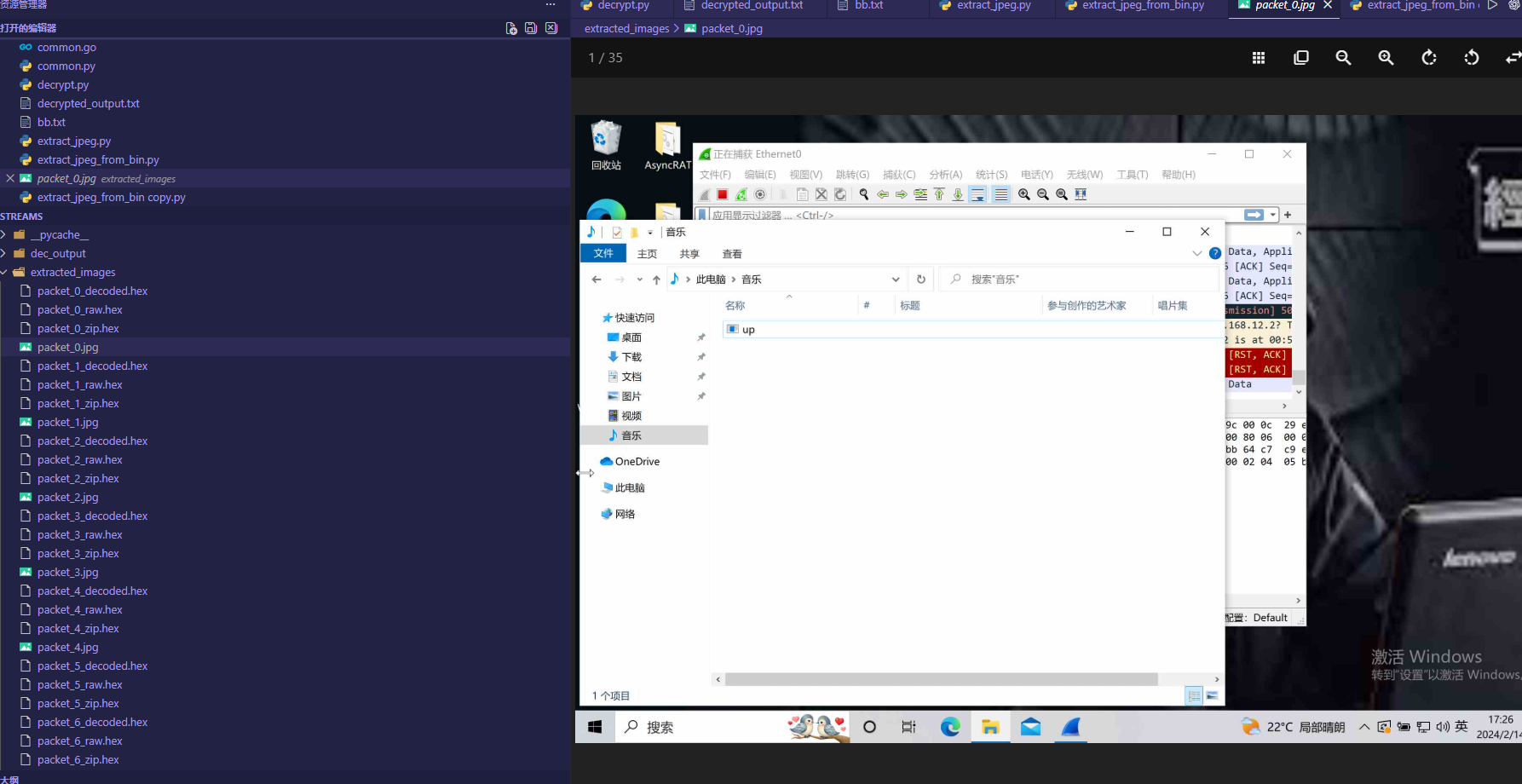
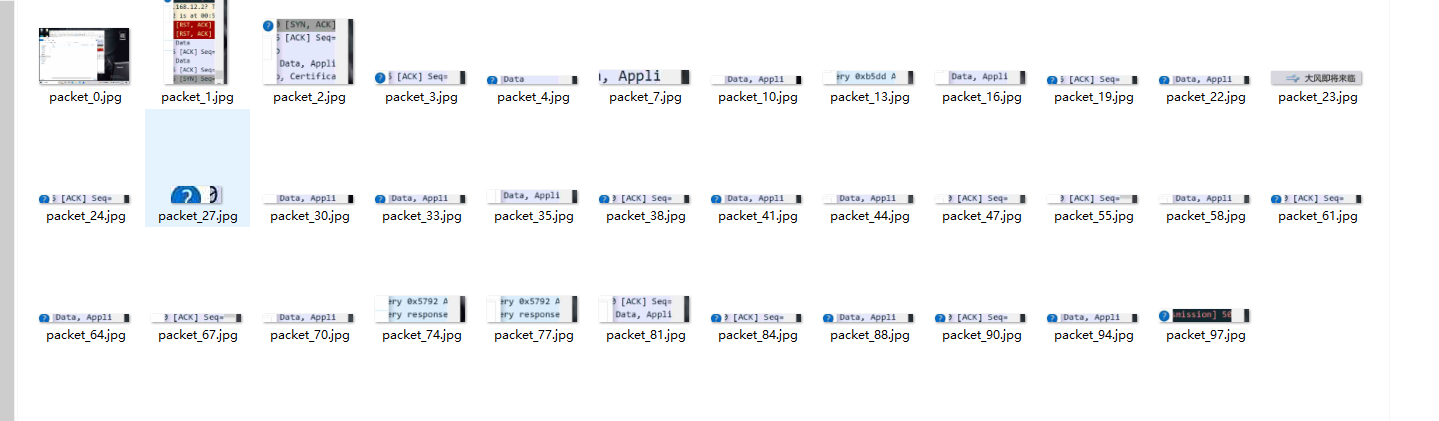
这样就会生成一个目录,
可以看到攻击者rdp了主机,看了一个程序 up.exe
在解析中也可以看到相关程序。
总的来说就是先解tls,在进行去除不需要的数据,在进行gunzip。
这里小伙伴也是不知道问题是啥了,看所有数据应该是这个了,有小伙伴知道的话,麻烦告知一下,咱们在研究。
致谢 最后感谢您读到现在,这篇文章匆忙构成肯定有不周到或描述不正确的地方,期待业界师傅们用各种方式指正勘误。如果您感觉文章写的不错,帮笔者点给公众号点点关注,先谢谢大家了。
emmm 太菜了
参考 1 2 https://mp.weixin.qq.com/s/AJUQ8Zd_4Q3Ub9TarQx5Gg AsyncRAT通信模型剖析 https://xz.aliyun.com/news/12945AsyncRAT通信模型剖析及自动化解密脚本实现